Asset Depreciation
Asset Management for Jira uses straight-line depreciation to calculate how an asset’s value decreases over time.
Once configured, depreciation values are automatically calculated for assets with a Purchase Price and Purchase Date value.
You can then view these values in the main asset list, export them, and create custom depreciation reports.
How to Configure Asset Depreciation:
Step 1: Open Asset Depreciation Settings
Navigate to Settings and select the Asset Depreciation tab.
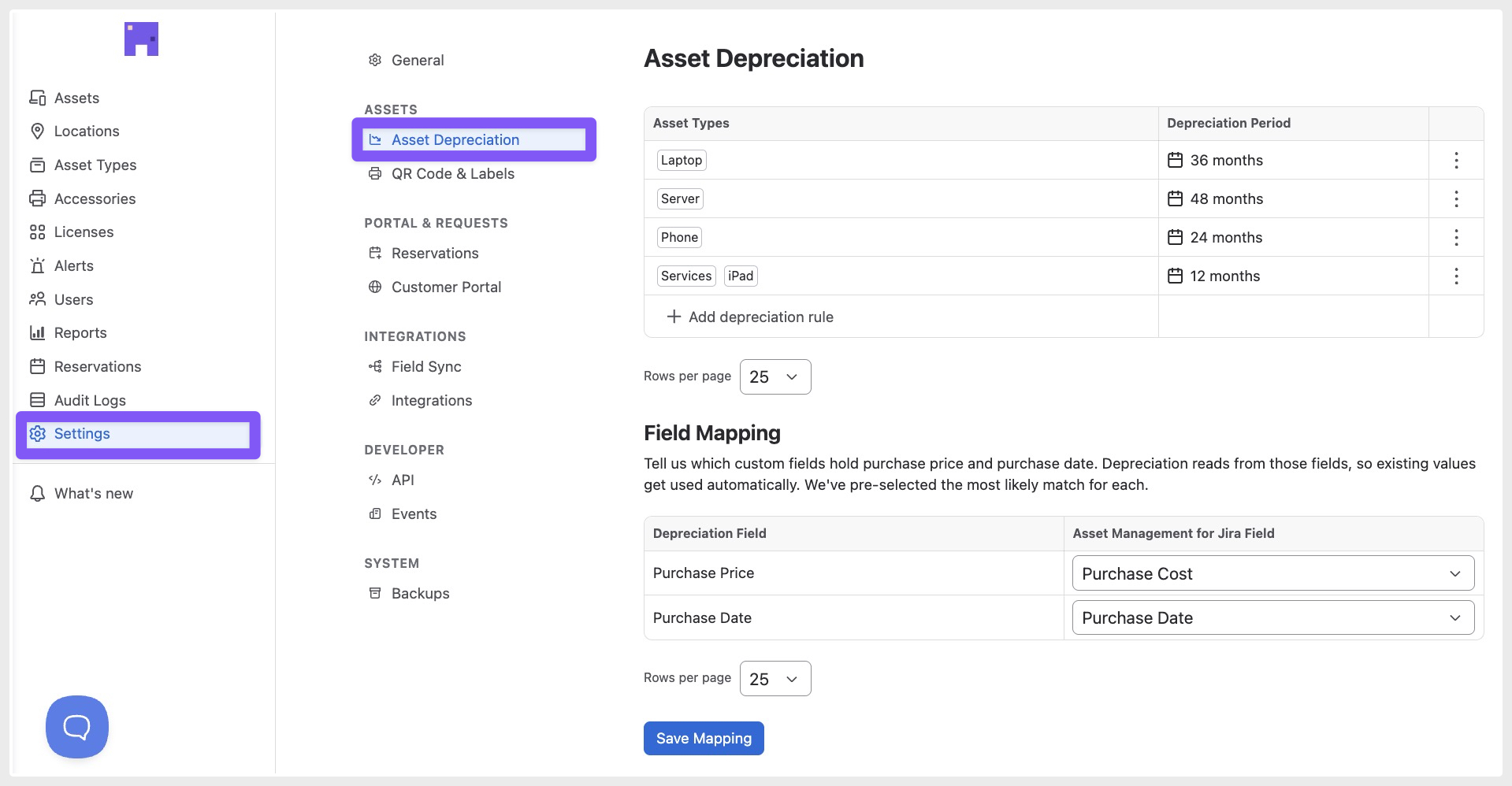
Step 2: Review Field Mapping
The following fields are pre-mapped to the most likely matching fields in your system:
- Purchase Price
- Purchase Date
If needed, you can update these mappings to match your existing fields, then click Save Mapping.

Step 3: Create a Depreciation Rule
To enable depreciation calculations:
- Select an asset type
- Enter the depreciation period (in months)
- Click Add rule

Result
Once configured, any asset of the selected type with values in the mapped Purchase Price and Purchase Date fields will automatically have depreciation calculated.
AMFJ will display:
- Current Value
- Depreciation Percentage
- End of Life

Please do not hesitate to reach out to our support team at support@assetmanagementforjira.com if you have any questions or feedback related to this article.